2. Processing images#
// Halide tutorial lesson 2: Processing images

// This lesson demonstrates how to pass in input images and manipulate
// them.

// On linux, you can compile and run it like so:
// g++ lesson_02*.cpp -g -I <path/to/include> -I <path/to/tools> -L <path/to/lib> -lHalide $(pkg-config --cflags --libs libpng libjpeg) -lpthread -ldl -o lesson_02 -std=c++17
// LD_LIBRARY_PATH=<path/to/lib> ./lesson_02

// On macOS:
// g++ lesson_02*.cpp -g -I <path/to/include> -I <path/to/tools> -L <path/to/lib> -lHalide $(pkg-config --cflags --libs libpng libjpeg) -o lesson_02 -std=c++17
// DYLD_LIBRARY_PATH=<path/to/lib> ./lesson_02

// The only Halide header file you need is Halide.h. It includes all of Halide.
#include "Halide.h"

// Include some support code for loading pngs.
#include "halide_image_io.h"
using namespace Halide::Tools;

int main() {

    // This program defines a single-stage imaging pipeline that
    // brightens an image.

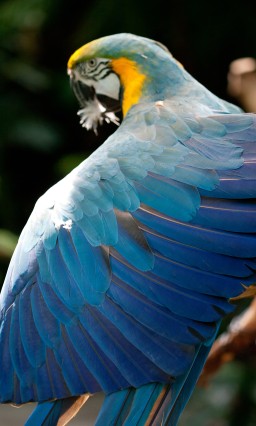
    // First we'll load the input image we wish to brighten.
    Halide::Buffer<uint8_t> input = load_image("images/rgb.png");

    // See below for a smaller version.
    // Next we define our Func object that represents our one pipeline
    // stage.
    Halide::Func brighter;

    // Our Func will have three arguments, representing the position
    // in the image and the color channel. Halide treats color
    // channels as an extra dimension of the image.
    Halide::Var x, y, c;

    // Normally we'd probably write the whole function definition on
    // one line. Here we'll break it apart so we can explain what
    // we're doing at every step.

    // For each pixel of the input image.
    Halide::Expr value = input(x, y, c);

    // Cast it to a floating point value.
    value = Halide::cast<float>(value);

    // Multiply it by 1.5 to brighten it. Halide represents real
    // numbers as floats, not doubles, so we stick an 'f' on the end
    // of our constant.
    value = value * 1.5f;

    // Clamp it to be less than 255, so we don't get overflow when we
    // cast it back to an 8-bit unsigned int.
    value = Halide::min(value, 255.0f);

    // Cast it back to an 8-bit unsigned integer.
    value = Halide::cast<uint8_t>(value);

    // Define the function.
    brighter(x, y, c) = value;

    // The equivalent one-liner to all of the above is:
    //
    // brighter(x, y, c) = Halide::cast<uint8_t>(min(input(x, y, c) * 1.5f, 255));
    //
    // In the shorter version:
    // - I skipped the cast to float, because multiplying by 1.5f does
    //   that automatically.
    // - I also used an integer constant as the second argument in the
    //   call to min, because it gets cast to float to be compatible
    //   with the first argument.
    // - I left the Halide:: off the call to min. It's unnecessary due
    //   to Koenig lookup.

    // Remember, all we've done so far is build a representation of a
    // Halide program in memory. We haven't actually processed any
    // pixels yet. We haven't even compiled that Halide program yet.

    // So now we'll realize the Func. The size of the output image
    // should match the size of the input image. If we just wanted to
    // brighten a portion of the input image we could request a
    // smaller size. If we request a larger size Halide will throw an
    // error at runtime telling us we're trying to read out of bounds
    // on the input image.
    Halide::Buffer<uint8_t> output =
        brighter.realize({input.width(), input.height(), input.channels()});

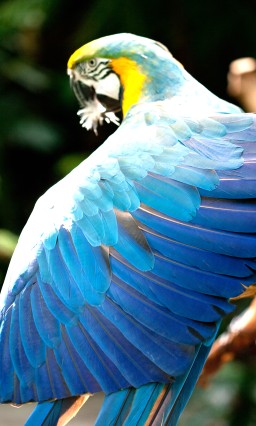
    // Save the output for inspection. It should look like a bright parrot.
    save_image(output, "brighter.png");

    // See below for a small version of the output.
    printf("Success!\n");
    return 0;
}
# Halide tutorial lesson 2.

# This lesson demonstrates how to pass in input images.

import halide as hl
import numpy as np
import halide.imageio
import os.path


def main():
    # This program defines a single-stage imaging pipeline that
    # brightens an image.

    # First we'll load the input image we wish to brighten.
    image_path = os.path.join(
        os.path.dirname(__file__), "../../tutorial/images/rgb.png"
    )

    # We create a hl.Buffer object to wrap the numpy array
    input = hl.Buffer(halide.imageio.imread(image_path))
    assert input.type() == hl.UInt(8)

    # Next we define our hl.Func object that represents our one pipeline
    # stage.
    brighter = hl.Func("brighter")

    # Our hl.Func will have three arguments, representing the position
    # in the image and the color channel. Halide treats color
    # channels as an extra dimension of the image.
    x, y, c = hl.Var("x"), hl.Var("y"), hl.Var("c")

    # Normally we'd probably write the whole function definition on
    # one line. Here we'll break it apart so we can explain what
    # we're doing at every step.

    # For each pixel of the input image.
    value = input[x, y, c]
    assert type(value) is hl.Expr

    # Cast it to a floating point value.
    value = hl.cast(hl.Float(32), value)

    # Multiply it by 1.5 to brighten it. Halide represents real
    # numbers as floats, not doubles, so we stick an 'f' on the end
    # of our constant.
    value = value * 1.5

    # Clamp it to be less than 255, so we don't get overflow when we
    # hl.cast it back to an 8-bit unsigned int.
    value = hl.min(value, 255.0)

    # Cast it back to an 8-bit unsigned integer.
    value = hl.cast(hl.UInt(8), value)

    # Define the function.
    brighter[x, y, c] = value

    # The equivalent one-liner to all of the above is:
    #
    # brighter(x, y, c) = hl.cast<uint8_t>(hl.min(input(x, y, c) * 1.5f, 255))
    # brighter[x, y, c] = hl.cast(hl.UInt(8), hl.min(input[x, y, c] * 1.5, 255))
    #
    # In the shorter version:
    # - I skipped the hl.cast to float, because multiplying by 1.5f does
    #   that automatically.
    # - I also used integer constants in hl.clamp, because they get hl.cast
    #   to match the type of the first argument.
    # - I left the h. off hl.clamp. It's unnecessary due to Koenig
    #   lookup.

    # Remember. All we've done so far is build a representation of a
    # Halide program in memory. We haven't actually processed any
    # pixels yet. We haven't even compiled that Halide program yet.

    # So now we'll realize the hl.Func. The size of the output image
    # should match the size of the input image. If we just wanted to
    # brighten a portion of the input image we could request a
    # smaller size. If we request a larger size Halide will throw an
    # error at runtime telling us we're trying to read out of bounds
    # on the input image.
    output_image = brighter.realize([input.width(), input.height(), input.channels()])
    assert output_image.type() == hl.UInt(8)

    # Save the output for inspection. It should look like a bright parrot.
    # python3-imageio versions <2.5 expect a numpy array
    halide.imageio.imwrite("brighter.png", np.asanyarray(output_image))
    print("Created brighter.png result file.")

    print("Success!")
    return 0


if __name__ == "__main__":
    main()